-
Interactive DashboardsCreate interactive BI dashboards with dynamic visuals.
-
End-User BI ReportsCreate and deploy enterprise BI reports for use in any vertical.
-
Wyn AlertsSet up always-on threshold notifications and alerts.
-
Localization SupportChange titles, labels, text explanations, and more.
-
Wyn ArchitectureA lightweight server offers flexible deployment.
-
 Wyn Enterprise 7.1 is ReleasedThis release emphasizes Wyn document embedding and enhanced analytical express...
 -
 Choosing an Embedded BI Solution for SaaS ProvidersAdding BI features to your applications will improve your products, better serve your customers, and more. But where to start? In this guide, we discuss the many options.
-
Visual GalleryInteractive sample dashboards and reports.
-
BlogExplore Wyn, BI trends, and more.
-
WebinarsDiscover live and on-demand webinars.
-
Customer SuccessVisualize operational efficiency and streamline manufacturing processes.
-
Knowledge BaseGet quick answers with articles and guides.
-
VideosVideo tutorials, trends and best practices.
-
WhitepapersDetailed reports on the latest trends in BI.
-
 Choosing an Embedded BI Solution for SaaS ProvidersAdding BI features to your applications will impr...
 -

Data Model Settings
As an administrator in the Wyn Enterprise Portal, you can configure global settings that control how data models behave across reports and direct models. These settings help optimize performance, manage data volume, and ensure consistent query behavior.
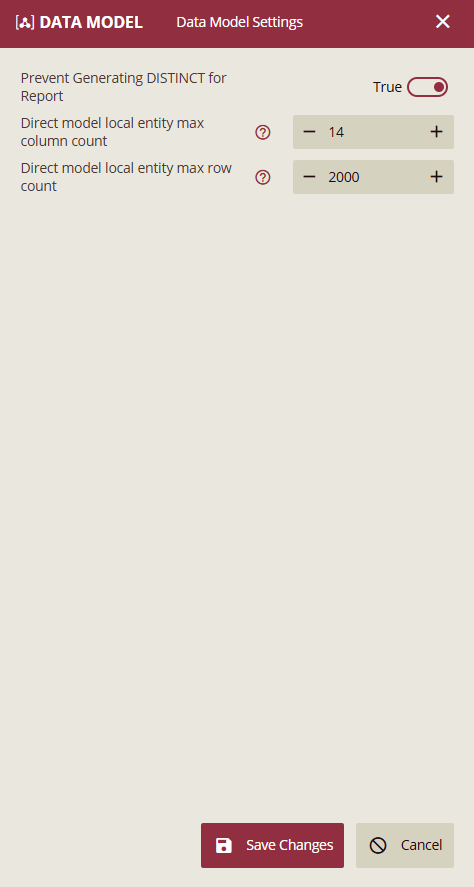
Access Data Model Settings
Open the Admin Portal.
Navigate to Configuration→ Data Model Settings.
The Data Model Settings panel opens, allowing you to view and modify available configuration options.
Prevent Generating DISTINCT for Report
Type: Toggle (True / False)
Default: True
Description:
Determines whether the system automatically generates the
DISTINCTkeyword when building report queries.Enabled (True)
Disables automatic
DISTINCTgeneration.Preserves duplicate records when fields from a data model are used in reports.
Recommended when using aggregation functions such as Sum or Count, where deduplication may result in incorrect values.
Disabled (False)
Allows the system to generate
DISTINCT.Duplicate records may be removed from the query result.
Expected Result: When enabled, report calculations are based on the original data set without enforced deduplication.
Direct Model Local Entity Max Column Count
Type: Numeric
Default: 14
Description
The default maximum value is 14; excessively large values can lead to a decrease in query performance or even prevent the return of query results.
Use the + / – buttons to adjust the value.
This setting helps limit schema width and maintain predictable performance.
Expected Result: Local entities that exceed the configured column limit cannot be created.
Direct Model Local Entity Max Row Count
Type: Numeric
Default: 2000
Description
The default maximum value is 200; excessively large values can lead to a decrease in query performance or even prevent the return of query results.
Adjust the limit using the + / – buttons.
Prevents excessive data from being materialized locally.
Expected Result: Once the row limit is reached, no additional rows are loaded into the local entity.
Actions
Save Changes: Saves the updated configuration and applies it across the environment.
Cancel: Discards all changes and closes the settings panel.