-
Interactive DashboardsCreate interactive BI dashboards with dynamic visuals.
-
End-User BI ReportsCreate and deploy enterprise BI reports for use in any vertical.
-
Wyn AlertsSet up always-on threshold notifications and alerts.
-
Localization SupportChange titles, labels, text explanations, and more.
-
Wyn ArchitectureA lightweight server offers flexible deployment.
-
 Wyn Enterprise 7.1 is ReleasedThis release emphasizes Wyn document embedding and enhanced analytical express...
 -
 Choosing an Embedded BI Solution for SaaS ProvidersAdding BI features to your applications will improve your products, better serve your customers, and more. But where to start? In this guide, we discuss the many options.
-
Visual GalleryInteractive sample dashboards and reports.
-
BlogExplore Wyn, BI trends, and more.
-
WebinarsDiscover live and on-demand webinars.
-
Customer SuccessVisualize operational efficiency and streamline manufacturing processes.
-
Knowledge BaseGet quick answers with articles and guides.
-
VideosVideo tutorials, trends and best practices.
-
WhitepapersDetailed reports on the latest trends in BI.
-
 Choosing an Embedded BI Solution for SaaS ProvidersAdding BI features to your applications will impr...
 -

- Getting Started
- Administration Guide
-
User Guide
- An Introduction to Wyn Enterprise
- Document Portal for End Users
- Data Governance and Modeling
- View and Manage Documents
- Working with Resources
- Working with Reports
- Working with Dashboards
- Working with Notebooks
- Wyn Analytical Expressions
- Section 508 Compliance
- Subscribe to RSS Feed for Wyn Builds Site
- Developer Guide
WynSQL
You can use the native SQL dialect supported by the relational database you use. For other non-relational data sources, Wyn provides WynSQL, which is a subset of SQL used to query non-relational data sources like Excel, CSV, JSON, XML, MongoDB, and OData.
Furthermore, WynSQL can be used in the following designers:
CustomSQLTable in the dataset designer.
Create an entity in the cached model designer.
SQLExpression in the dataset designer.
SQL expression used to create attributes in the cached model designer.
SQL is used to create datasets based on a DataSource in the report designer.
Custom SQL in the data query endpoint API.
PreQuery in Web JSON DataSource editor.
WynSql emulates the SQLite SQL syntax standard with the following limitations:
Supports only SELECT statements, which also support the LIMIT clause to limit the number of rows returned, e.g.,
SELECT * FROM Demo_OrderDetail LIMIT 5.You can only reference columns in the GROUP BY and the ORDER BY clauses, but not expressions.
WynSQL supports groups of built-in functions that you can find below. You cannot use SQLite's built-in functions.
WynSql Function Reference
Note: If a function requires an enum value as an argument, use the literal value of the enum directly without single/double quotes.
Example:
StrLike(column1, 'start%', Text)
Mathematics Functions
Function | Syntax | Description |
|---|---|---|
Abs |
| Returns the absolute value of the specified number |
Acos |
| Returns the angle (in radians) whose cosine is the specified number |
Asin |
| Returns the angle (in radians) whose sine is the specified number |
Atan |
| Returns the angle (in radians) whose tangent is the specified number |
Atn2 |
| Returns the angle (in radians) whose tangent is the quotient of two specified numbers |
Ceiling |
| Returns the smallest integer greater than or equal to the specified number |
Cos |
| Returns the cosine of the specified angle |
Cot |
| Returns the cotangent of the specified angle (in radians) |
Degrees |
| Converts radians to degrees |
Exp |
| Returns e raised to the specified power |
Floor |
| Returns the largest integer less than or equal to the specified number |
Log |
| Returns the natural logarithm (base e) of the specified number |
Log10 |
| Returns the base-10 logarithm of the specified number |
PI |
| Returns the value of π |
Power |
| Returns the specified number raised to the specified power |
Radians |
| Converts degrees to radians |
Rand |
| Returns a random floating-point number between 0 and 1, or a random integer within a specified range |
Round |
| Rounds a number to the nearest integer or specified decimal places |
Sign |
| Returns the sign of the specified number (-1, 0, or 1) |
Sin |
| Returns the sine of the specified angle |
Sqrt |
| Returns the square root of the specified number |
Square |
| Returns the square of the specified number |
Tan |
| Returns the tangent of the specified angle |
Date and Time Functions
Function | Syntax | Description |
|---|---|---|
DateAdd |
| Adds a time interval to a date |
DateDiff |
| Returns the difference between two dates |
DateFromParts |
| Creates a date from year, month, and day components |
DatePart |
| Returns a specific part of a date |
EOMonth |
| Returns the last day of the month |
GetDate |
| Returns the current system date and time |
GetUtcDate |
| Returns the current UTC date and time |
FiscalYear |
| Returns the fiscal year |
Text Functions
Function | Syntax | Description |
|---|---|---|
Concat |
| Concatenates strings |
Format |
| Formats a value with the specified format |
IndexOf |
| Returns the position of a substring |
IsNull |
| Checks if a value is null |
Left |
| Returns the left part of a string |
Len |
| Returns the length of a string |
Lower |
| Converts to lowercase |
LTrim |
| Removes leading spaces |
Replace |
| Replaces occurrences of a pattern |
Replicate |
| Repeats a string |
Reverse |
| Reverses a string |
Right |
| Returns the right part of a string |
RTrim |
| Removes trailing spaces |
SubString |
| Extracts a substring |
ToString |
| Converts to string |
Trim |
| Removes leading and trailing spaces |
Upper |
| Converts to uppercase |
Other Functions
Function | Syntax | Description |
|---|---|---|
Array |
| Creates an array |
Category |
| Categorizes a value into a range |
CustomCategory |
| Custom categorization |
Type Conversion Functions
Function | Syntax | Description |
|---|---|---|
CBool |
| Converts to a boolean |
CByte |
| Converts to a byte |
CChar |
| Converts to char |
CDate |
| Converts to DateTime |
CDbl |
| Converts to double |
CDec |
| Converts to decimal |
CInt |
| Converts to int |
CLng |
| Converts to long |
CShort |
| Converts to short |
CSng |
| Converts to float |
CStr |
| Converts to string |
Financial Functions
Function | Syntax | Description |
|---|---|---|
DDB |
| Double-declining balance depreciation |
FV |
| Future value of an annuity |
IPMT |
| Interest payment for a period |
NPER |
| Number of periods for an annuity |
PMT |
| Payment for an annuity |
PPMT |
| Principal payment for a period |
PV |
| Present value of an annuity |
RATE |
| Interest rate per period |
SLN |
| Straight-line depreciation |
SYD |
| Sum-of-years' digits depreciation |
CASE...WHEN
WynSQL supports the Case...When the SQL statement. It can be used in the following cases:
Use Case...When, when evaluating a list of conditions, and returns one of multiple possible result expressions.
The CASE expression has two formats:
The simple CASE expression compares an expression to a set of simple expressions to determine the result.
The searched CASE expression evaluates a set of Boolean expressions to determine the result.
Both formats support an optional ELSE argument.
Format 1: Simple CASE expression: The result is determined by comparing an expression to a set of simple expressions:
  CASE input_expression
    WHEN when_expression
    THEN result_expression [ ...n ]
    [ ELSE else_result_expression ]
   END
Example: In this example, we have added a Custom SQL Table in the dataset designer using the following Case..When SQL expression
  SELECT ProductName,
     CASE 1
     WHEN ProductName = 'Chai' THEN  'Beverage'
     WHEN ProductName = 'Tofu' THEN 'Dairy'
     END as casewhen
  From Products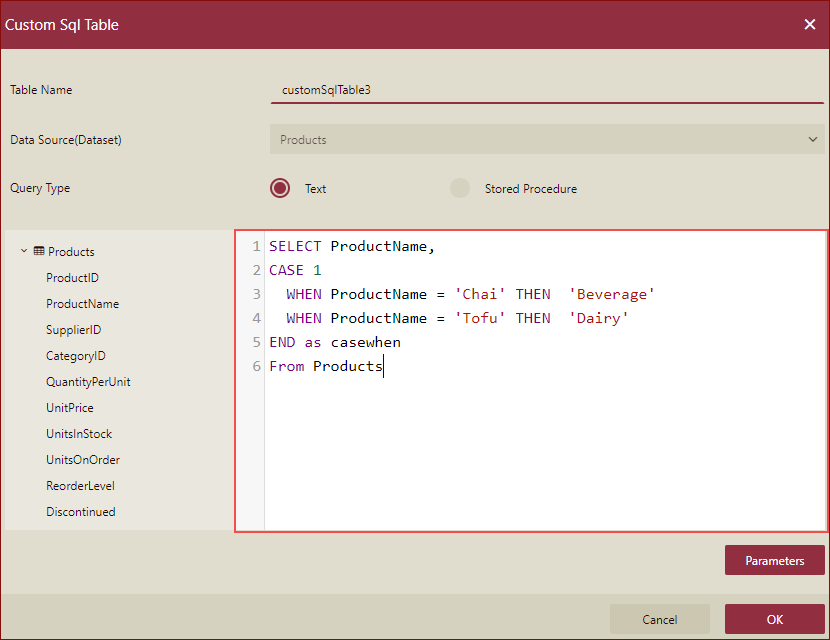
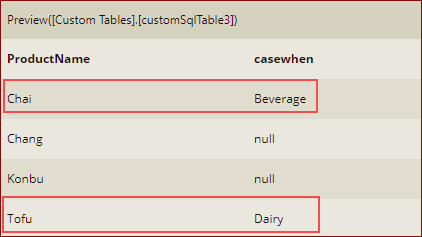
When you preview, the result is as shown below.
Format 2: Searched CASE expression: The result is determined by evaluating a set of Boolean expressions.
   CASE WHEN Boolean_expression
      THEN result_expression [ ...n ]
      [ ELSE else_result_expression ]
END Example: In this example, we have added a Custom SQL Table in the dataset designer using the following Case..When SQL expression
    SELECT ProductName, SupplierID,
            CASE WHEN UnitPrice <100 THEN 'Under 100'
                 WHEN UnitPrice >=100 AND UnitPrice<200 THEN 'Under 200'
                 ELSE 'Over 200'
            END
    FROM Products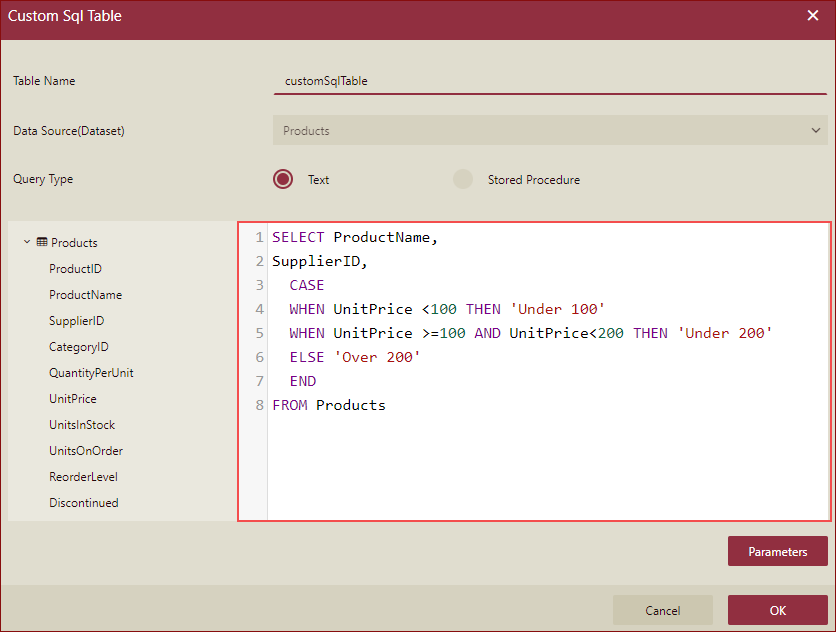
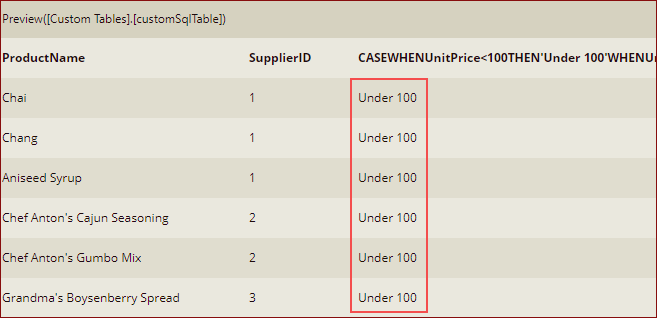
When you preview, the result is as shown below.
Case..When Limitations
WynSQL does not support the use of subqueries in the Case...When syntax.
WynSQL does not support the use of Case...When expression in Order By.
WynSQL does not support the use of Case...When expression in Group By.