-
Interactive DashboardsCreate interactive BI dashboards with dynamic visuals.
-
End-User BI ReportsCreate and deploy enterprise BI reports for use in any vertical.
-
Wyn AlertsSet up always-on threshold notifications and alerts.
-
Localization SupportChange titles, labels, text explanations, and more.
-
Wyn ArchitectureA lightweight server offers flexible deployment.
-
 Wyn Enterprise 7.1 is ReleasedThis release emphasizes Wyn document embedding and enhanced analytical express...
 -
 Choosing an Embedded BI Solution for SaaS ProvidersAdding BI features to your applications will improve your products, better serve your customers, and more. But where to start? In this guide, we discuss the many options.
-
Visual GalleryInteractive sample dashboards and reports.
-
BlogExplore Wyn, BI trends, and more.
-
WebinarsDiscover live and on-demand webinars.
-
Customer SuccessVisualize operational efficiency and streamline manufacturing processes.
-
Knowledge BaseGet quick answers with articles and guides.
-
VideosVideo tutorials, trends and best practices.
-
WhitepapersDetailed reports on the latest trends in BI.
-
 Choosing an Embedded BI Solution for SaaS ProvidersAdding BI features to your applications will impr...
 -

- Getting Started
- Administration Guide
-
User Guide
- An Introduction to Wyn Enterprise
- Document Portal for End Users
- Data Governance and Modeling
- View and Manage Documents
- Working with Resources
- Working with Reports
- Working with Dashboards
- Working with Notebooks
- Wyn Analytical Expressions
- Section 508 Compliance
- Subscribe to RSS Feed for Wyn Builds Site
- Developer Guide
Past Value Calculation
Past value calculations compare the current value against a previous point in time. Rather than displaying only the original value, the chart can show the value from an earlier period, such as the previous month, quarter, or year.
Past value calculations are useful when you want to compare current performance with historical performance. They can help reveal trends, identify seasonality, and show whether a value is improving or declining over time.
Past Value is only available when a date attribute is bound to the Axis (Category) data binding slot. It can also be used when a date attribute is bound to the Legend (Series) data binding slot, although that scenario is less common and typically more complex.
Applying a past value calculation fundamentally changes how the chart is interpreted. The value axis no longer represents the original measure alone. Instead, it represents a value from a previous period, or a comparison between the current value and a previous period, depending on the selected configuration.
Understanding Past Value Calculation Settings
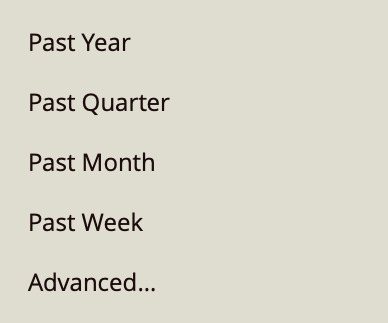
When you select Past Value from the Quick Functions menu, several predefined options are available.
Past Year
Past Year compares each value to the value from one year earlier.
Past Quarter
Past Quarter compares each value to the value from one quarter earlier.
Past Month
Past Month compares each value to the value from one month earlier.
Past Week
Past Week compares each value to the value from one week earlier.
Advanced
The Advanced option provides more control over how the comparison is calculated. It is also shared by related Quick Functions such as Change Over Time and % Change Over Time.
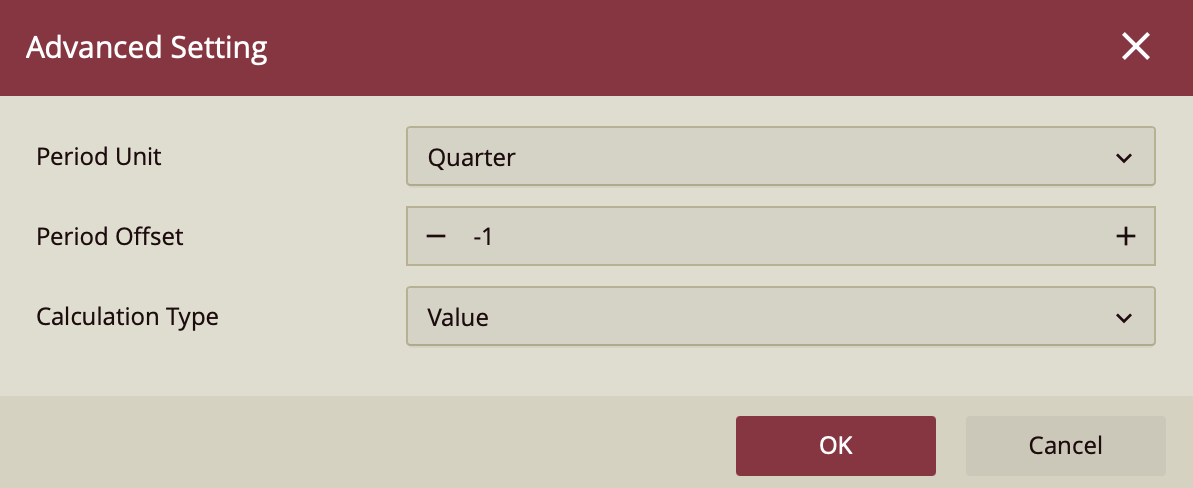
The Advanced configuration panel includes the following settings:
Period Unit
The Period Unit determines the time interval used for the comparison.
Available options are:
Year
Quarter
Month
Week
Day
Hour
Minute
Second
Period Offset
The Period Offset determines how far backward or forward the comparison should look.
A value of -1 compares the current value to the immediately previous period. For example:
Year with an offset of -1 compares to the previous year.
Quarter with an offset of -1 compares to the previous quarter.
Month with an offset of -1 compares to the previous month.
You can also use larger offsets. For example, an offset of -2 compares to two periods earlier, while an offset of 1compares to the next period.
Calculation Type
The Calculation Type determines how the current value and past value are compared.
Value returns the actual value from the previous period.
Ratio returns the ratio between the current value and the previous value.
Difference returns the numeric difference between the current value and the previous value.
Percent Difference returns the percentage change between the current value and the previous value.
The selected calculation type can also affect which Quick Function appears selected in the menu:
If Calculation Type is set to Value, the Quick Function remains under Past Value.
If Calculation Type is set to Ratio or Difference, the Quick Function appears under Change Over Time.
If Calculation Type is set to Percent Difference, the Quick Function appears under % Change Over Time.
Similarly, when the Advanced settings match one of the predefined options, the predefined option appears selected in the Quick Functions menu. For example, if the configuration uses:
Period Unit: Quarter
Period Offset: -1
Calculation Type: Value
then the Quick Functions menu displays Past Quarter rather than Advanced. The Advanced label typically only appears when the configuration does not match one of the predefined options.
Past Value Calculation on a Column Chart
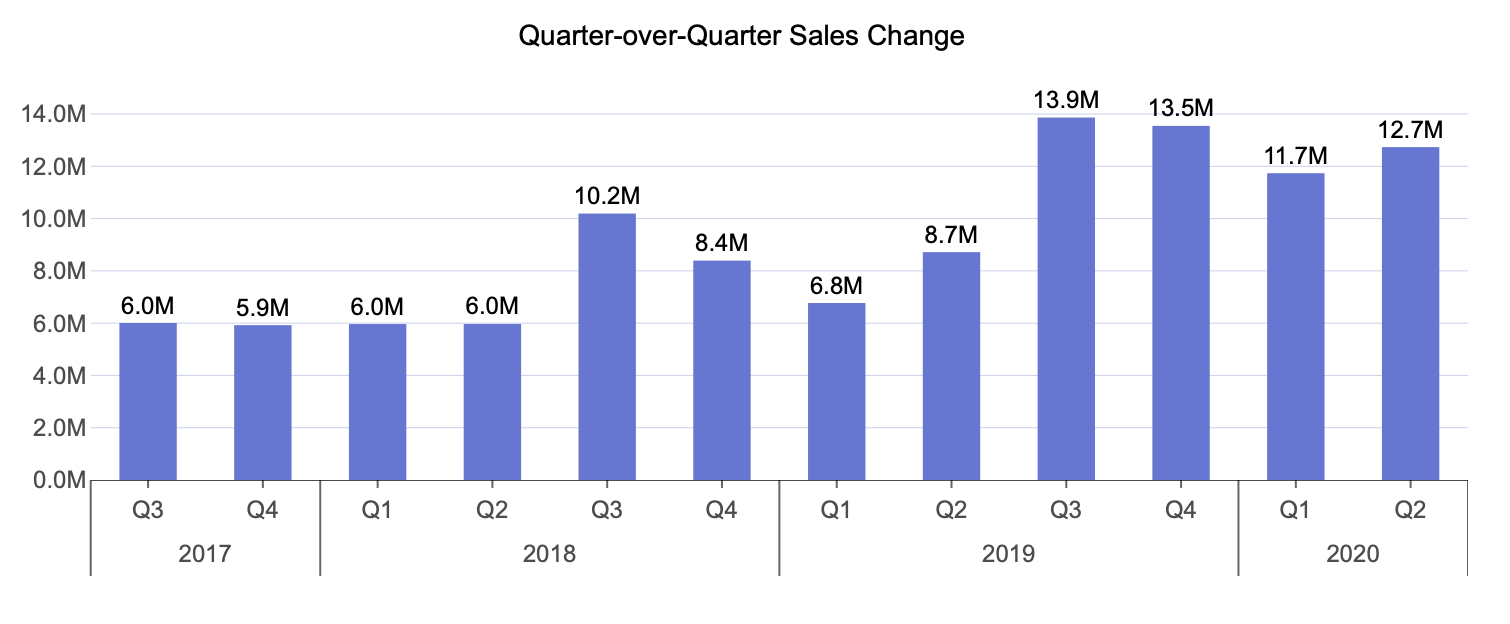
In this example, a past value calculation is applied across the entire dataset to show sales from the previous quarter.
Create a column chart and bind Sales Amount to the Values data binding slot.
Bind Date (Year) and Date (Quarter) to the Axis (Category) data binding slot, in that order, using the existing date hierarchy from the data model.
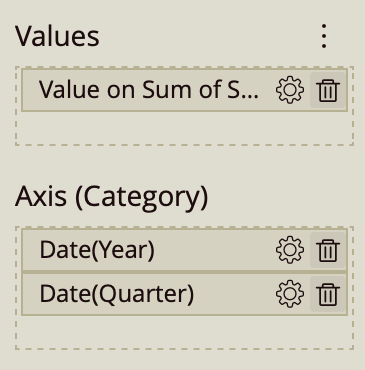
Open the Quick Functions menu for Sales Amount (gear icon) and select Past Quarter.
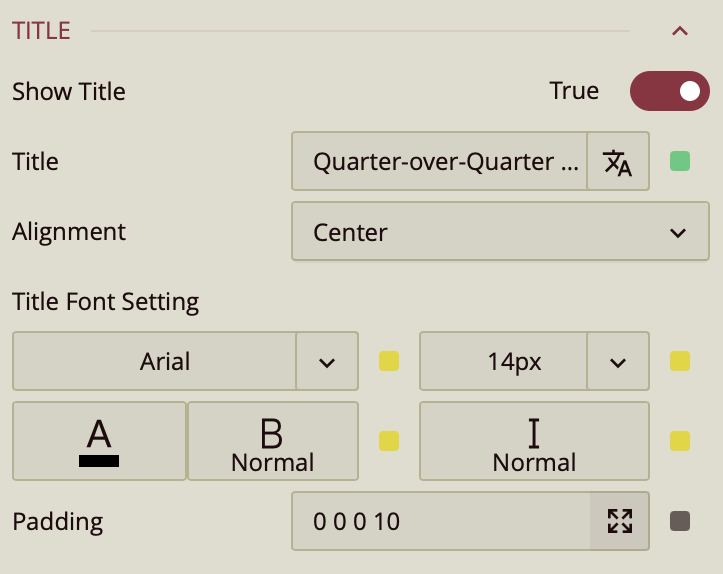
In the Inspector panel, expand the Title section and set the title to Quarter-over-Quarter Sales Change.
In this configuration, the chart displays the sales value from the previous quarter for each quarter in the sequence. Rather than showing the current quarter's original sales amount, each column reflects the corresponding value from one quarter earlier.