-
Interactive DashboardsCreate interactive BI dashboards with dynamic visuals.
-
End-User BI ReportsCreate and deploy enterprise BI reports for use in any vertical.
-
Wyn AlertsSet up always-on threshold notifications and alerts.
-
Localization SupportChange titles, labels, text explanations, and more.
-
Wyn ArchitectureA lightweight server offers flexible deployment.
-
 Wyn Enterprise 7.1 is ReleasedThis release emphasizes Wyn document embedding and enhanced analytical express...
 -
 Choosing an Embedded BI Solution for SaaS ProvidersAdding BI features to your applications will improve your products, better serve your customers, and more. But where to start? In this guide, we discuss the many options.
-
Visual GalleryInteractive sample dashboards and reports.
-
BlogExplore Wyn, BI trends, and more.
-
WebinarsDiscover live and on-demand webinars.
-
Customer SuccessVisualize operational efficiency and streamline manufacturing processes.
-
Knowledge BaseGet quick answers with articles and guides.
-
VideosVideo tutorials, trends and best practices.
-
WhitepapersDetailed reports on the latest trends in BI.
-
 Choosing an Embedded BI Solution for SaaS ProvidersAdding BI features to your applications will impr...
 -

- Getting Started
-
Administration Guide
- Installing Wyn Enterprise
- Configuration Settings
- Account Management
- Security Management
- System Management
- Document Management
- How To and Troubleshooting
- User Guide
- Developer Guide
Vectorized Data
The Vectorized Data section enables administrators to manage different entities: Datasets, Data Model, and User Knowledge that have been vectorized for AI-powered semantic search and embedding models. This functionality is essential for improving data retrieval and enabling natural language query performance.
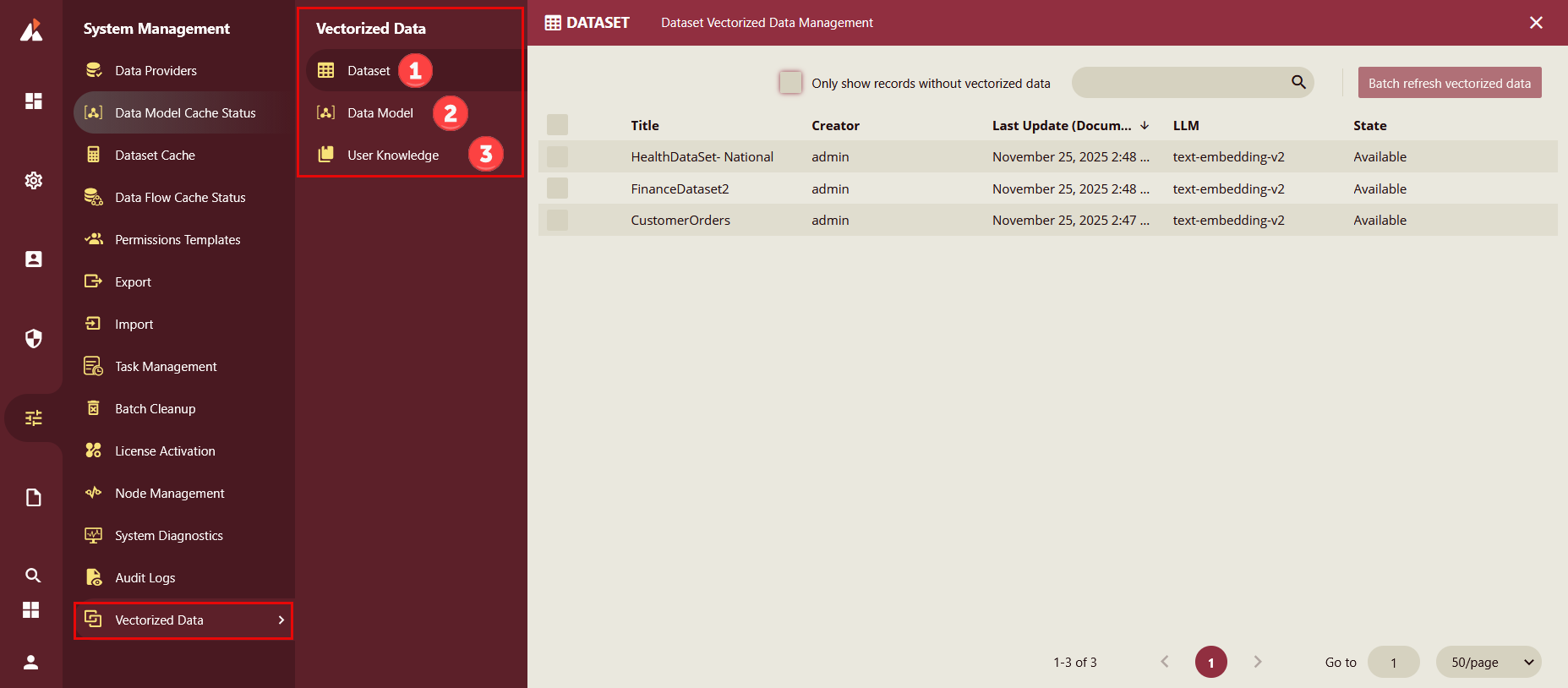
Dataset
The Dataset section under Vectorized Data enables administrators to manage datasets that have been vectorized for AI-powered semantic search and embedding models.
Navigate to: System Management > Vectorized Data > Dataset.
Options:
Only show records without vectorized data: Filter datasets that have not yet been vectorized.
Search Bar: Quickly locate datasets by name.
Batch refresh vectorized data: Re-run vectorization for multiple datasets at once.
Title: Name of the dataset (e.g.,
HealthDataSet: National,FinanceDataset2,CustomerOrders).Creator: User who created the dataset (e.g.,
admin).Last Update: Timestamp of the most recent update.
LLM: Indicates the embedding model used (e.g.,
text-embedding-v2).State: Current status of vectorization (e.g.,
Available).After vectorization, the State column should display Available.
The LLM column confirms the embedding model applied.
Data Model
The Data Model section under Vectorized Data enables administrators to manage data models that have been vectorized for AI-powered semantic search and embedding models.
Navigate to: System Management > Vectorized Data > Data Model.
Options:
Only show records without vectorized data: Filter data models that have not yet been vectorized.
Search Bar: Quickly locate data models by name.
Batch refresh vectorized data: Re-run vectorization for multiple data models at once.
Title: Name of the data model (e.g.,
Demo 1,Demo).Creator: The user who created the data model.
Last Update: Timestamp of the most recent update.
LLM: Indicates the embedding model used.
State: Current status of vectorization (e.g.,
Available,Missing).After successful vectorization, the State column should display Available.
If incomplete, missing may appear.
User Knowledge
The User Knowledge section under Vectorized Data enables administrators to manage knowledge bases that have been vectorized for semantic search and AI-driven insights.
Navigate to: System Management > Vectorized Data > User Knowledge
Options:
Only show records without vectorized data: Filter knowledge bases that have not yet been vectorized.
Search Bar: Quickly locate knowledge bases by name.
Batch refresh vectorized dataRe-run vectorization for multiple knowledge bases at once.
Title: Name of the knowledge base.
Creator: The user who created the knowledge base.
Last Update: Timestamp of the most recent update.
LLM: Indicates the embedding model used.
State: Current status of vectorization (e.g.,
Available,Missing).