-
Interactive DashboardsCreate interactive BI dashboards with dynamic visuals.
-
End-User BI ReportsCreate and deploy enterprise BI reports for use in any vertical.
-
Wyn AlertsSet up always-on threshold notifications and alerts.
-
Localization SupportChange titles, labels, text explanations, and more.
-
Wyn ArchitectureA lightweight server offers flexible deployment.
-
 Wyn Enterprise 7.1 is ReleasedThis release emphasizes Wyn document embedding and enhanced analytical express...
 -
 Choosing an Embedded BI Solution for SaaS ProvidersAdding BI features to your applications will improve your products, better serve your customers, and more. But where to start? In this guide, we discuss the many options.
-
Visual GalleryInteractive sample dashboards and reports.
-
BlogExplore Wyn, BI trends, and more.
-
WebinarsDiscover live and on-demand webinars.
-
Customer SuccessVisualize operational efficiency and streamline manufacturing processes.
-
Knowledge BaseGet quick answers with articles and guides.
-
VideosVideo tutorials, trends and best practices.
-
WhitepapersDetailed reports on the latest trends in BI.
-
 Choosing an Embedded BI Solution for SaaS ProvidersAdding BI features to your applications will impr...
 -

- Getting Started
- Administration Guide
-
User Guide
- An Introduction to Wyn Enterprise
- Document Portal for End Users
- Data Governance and Modeling
- View and Manage Documents
- Working with Resources
- Working with Reports
- Working with Dashboards
- Working with Notebooks
- Wyn Analytical Expressions
- Section 508 Compliance
- Subscribe to RSS Feed for Wyn Builds Site
- Developer Guide
Remove Duplicates
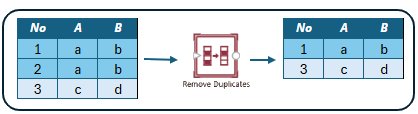
The Remove Duplicates transformation command removes rows with duplicate values in its input. The data is sorted either by a field you choose or by row number in the data source if no sort order is specified. The transform then compares the values of the selected comparison fields and keeps the top row based on the sort order, and removes the rest of the rows.
Configuration
After you add a Remove Duplicates ETL command to the ETL designer and connect an input to it, you need to select:
The comparison fields to check for duplicates.
For each comparison field, choose whether the comparison should be case-sensitive or not.
Specify the sort order used before comparison. The row at the top after the sort will be kept, and the rest of the rows will be removed.
Example
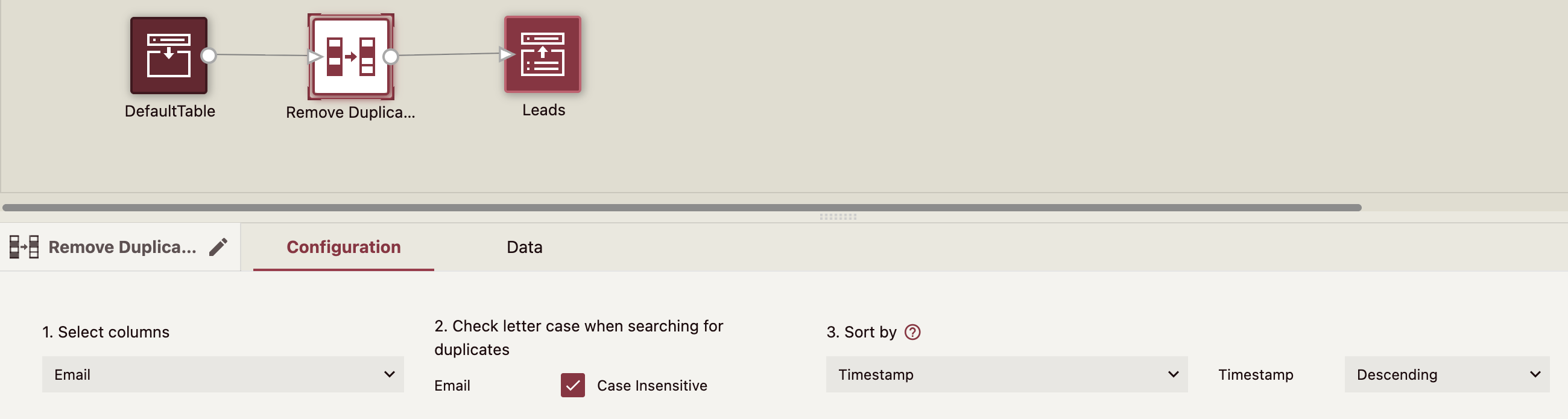
In this example, the Leads CSV contains duplicate leads from different sources, we used the Remove Duplicates command to keep one record per lead. The duplicates are identified by the email address and sorted by timestamp in descending order to keep the latest contact.