-
Interactive DashboardsCreate interactive BI dashboards with dynamic visuals.
-
End-User BI ReportsCreate and deploy enterprise BI reports for use in any vertical.
-
Wyn AlertsSet up always-on threshold notifications and alerts.
-
Localization SupportChange titles, labels, text explanations, and more.
-
Wyn ArchitectureA lightweight server offers flexible deployment.
-
 Wyn Enterprise 7.1 is ReleasedThis release emphasizes Wyn document embedding and enhanced analytical express...
 -
 Choosing an Embedded BI Solution for SaaS ProvidersAdding BI features to your applications will improve your products, better serve your customers, and more. But where to start? In this guide, we discuss the many options.
-
Visual GalleryInteractive sample dashboards and reports.
-
BlogExplore Wyn, BI trends, and more.
-
WebinarsDiscover live and on-demand webinars.
-
Customer SuccessVisualize operational efficiency and streamline manufacturing processes.
-
Knowledge BaseGet quick answers with articles and guides.
-
VideosVideo tutorials, trends and best practices.
-
WhitepapersDetailed reports on the latest trends in BI.
-
 Choosing an Embedded BI Solution for SaaS ProvidersAdding BI features to your applications will impr...
 -

- Getting Started
- Administration Guide
-
User Guide
- An Introduction to Wyn Enterprise
- Document Portal for End Users
- Data Governance and Modeling
-
View and Manage Documents
- View Documents
- Duplicate a Document
- Delete a Document
- Rename a Document
- Copy URL
- Hide a Document
- Share a Document
- Document Binder
-
Schedule a Task
- Report Bursting
- Task Delegation
- Document Binding
- Create a Scheduled Task to Run a Report
- Create a Scheduled Task to Run a Dashboard
- Create a Scheduled Task to Run a Datasource
- Create a Scheduled Task to Run a Dataset
- Create a Scheduled Task to Run a Data Model
- Create a Scheduled Task to Print a Report
- Create a Scheduled Task to Cache a Report
- Create a Scheduled Task on a SharePoint Site
- Enable Report Caching
- Restore Deleted Documents
- Monitor Data with Alerts
- Advanced Filter Settings
- Working with Resources
- Working with Reports
- Working with Dashboards
- Working with Notebooks
- Wyn Analytical Expressions
- Section 508 Compliance
- Subscribe to RSS Feed for Wyn Builds Site
- Developer Guide
Task Delegation
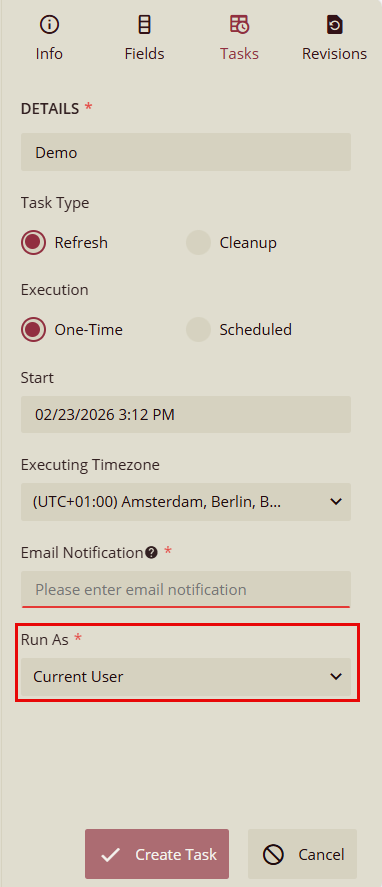
The Run As option defines which user context the system uses when executing a scheduled or one‑time task. This setting ensures tasks run with the correct permissions, dataset access rights, and security scope. It appears in the Tasks tab when creating or editing a task, as highlighted below:
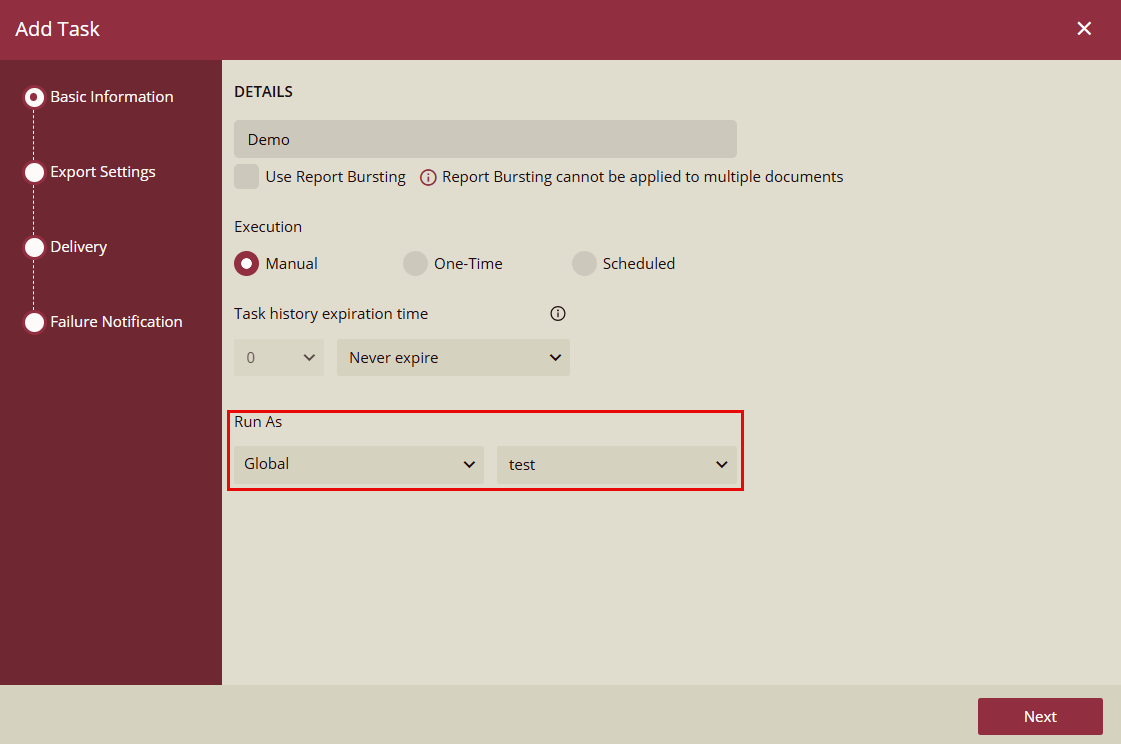
Add Task
The Run As option in the Add Task dialog allows you to specify the user account under which the task will execute. This ensures the task runs with the correct permissions, data access rights, and security context, especially important in environments with delegated task management or administrative task creation.
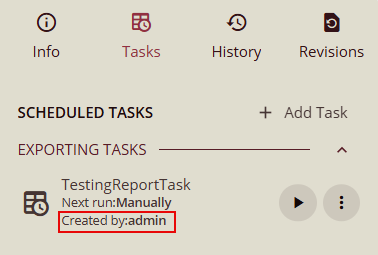
Task Card
The Created by label displays the user who created the task. The Created by field provides a clear audit reference indicating:
Who initiated the creation of the task.
Whether the task was created by an admin, an organization admin, or a delegate.
This information is especially important when tasks are created on behalf of other users through Task Delegation. It appears in the task list within the Tasks tab, as shown below: