-
Interactive DashboardsCreate interactive BI dashboards with dynamic visuals.
-
End-User BI ReportsCreate and deploy enterprise BI reports for use in any vertical.
-
Wyn AlertsSet up always-on threshold notifications and alerts.
-
Localization SupportChange titles, labels, text explanations, and more.
-
Wyn ArchitectureA lightweight server offers flexible deployment.
-
 Wyn Enterprise 7.1 is ReleasedThis release emphasizes Wyn document embedding and enhanced analytical express...
 -
 Choosing an Embedded BI Solution for SaaS ProvidersAdding BI features to your applications will improve your products, better serve your customers, and more. But where to start? In this guide, we discuss the many options.
-
Visual GalleryInteractive sample dashboards and reports.
-
BlogExplore Wyn, BI trends, and more.
-
WebinarsDiscover live and on-demand webinars.
-
Customer SuccessVisualize operational efficiency and streamline manufacturing processes.
-
Knowledge BaseGet quick answers with articles and guides.
-
VideosVideo tutorials, trends and best practices.
-
WhitepapersDetailed reports on the latest trends in BI.
-
 Choosing an Embedded BI Solution for SaaS ProvidersAdding BI features to your applications will impr...
 -

- Getting Started
- Administration Guide
-
User Guide
- An Introduction to Wyn Enterprise
- Document Portal for End Users
-
Data Governance and Modeling
- Data Binding Concepts
-
Introduction to Data Sources
- Connect to Oracle
- Connect to SQL Server
- Connect to MySQL
- Connect to Postgres
- Connect to Snowflake
- Connect to SQLite
- Connect to DM
- Connect to TiDB
- Connect to AnalyticDB(MySQL)
- Connect to GreenPlum
- Connect to TimeScale
- Connect to Amazon Redshift
- Connect to MariaDB
- Connect to ClickHouseV2
- Connect to MonetDB
- Connect to Kingbase
- Connect to GBase8a
- Connect to GBase8s
- Connect to ClickHouse
- Connect to IBM DB2
- Connect to IBM DB2 iSeries/AS400
- Connect to Doris
- Connect to OceanBase(MySQL)
- Connect to Kylin
- Connect to StarRocks
- Connect to Google BigQuery
- Connect to Hive (beta)
- Connect to ElasticSearch (beta)
- Connect to Hana
- Connect to Excel
- Connect to JSON
- Connect to CSV
- Connect to XML
- Connect to MongoDB
- Connect to ElasticSearchDSL
- Connect to InfluxDB
- Connect to SSAS
- Connect to ODBC
- Connect to OData
- Connect to TDengine
- Connect to Teradata
- Connect to Custom Provider
- Introduction to Data Model
- Introduction to Direct Query Model
- Introduction to Cached Model
- Introduction to Datasets
- Data Flow Designer
- Secure Data Management
- How To
- WynSQL
- View and Manage Documents
- Working with Resources
- Working with Reports
- Working with Dashboards
- Working with Notebooks
- Wyn Analytical Expressions
- Section 508 Compliance
- Subscribe to RSS Feed for Wyn Builds Site
- Developer Guide
Manage Pre-Request
Pre-Request supports the pre-call of another API request for a specific endpoint. Pre-Request works as an additional entity in the configuration, similar to the endpoint or base address, with its configuration section.
However, unlike an endpoint, a Pre-Request does not include a Pre-Query configuration. Instead, it allows the creation of variables, with values extracted from the Pre-Request response using JSON path expressions. These variables can be used in subsequent base addresses, endpoints, or other Pre-requests that reference this.
Note: A Pre-request cannot define its base address (it will always be Null), and will inherit from a higher-level base address.
The Base Address, Endpoint, and other Pre-Requests can reference a Pre-Request. However, if an endpoint specifies its own Pre-Request, it overrides the Pre-Request defined by the Base Address.
Add Pre-Request
To add a Pre-request,
Click the + button.
On the Add Pre-Request popup specify the configuration details as explained below,
Basic Configuration
Name: Specify a unique name identifier for the Pre-Request.
Pre-Request Parameter: Add parameters to the Pre-Request using the + button. Enter a name, select a data type, and multi-value, add a delimiter, and set the default value of the parameter.
Pre-Request Configuration
Pre-Request: This section defines the Pre-Request details. The Pre-Request allows you to send an initial API request to retrieve data (e.g., authentication tokens, data values) that will be used in subsequent API calls. The response of the Pre-Request can be processed to extract values using JSON paths, which are then made available as variables for use in other requests.
Request Configuration:
URL: Specify the endpoint URL of the Pre-Request.
Request Method: Select the HTTP method (GET or POST).
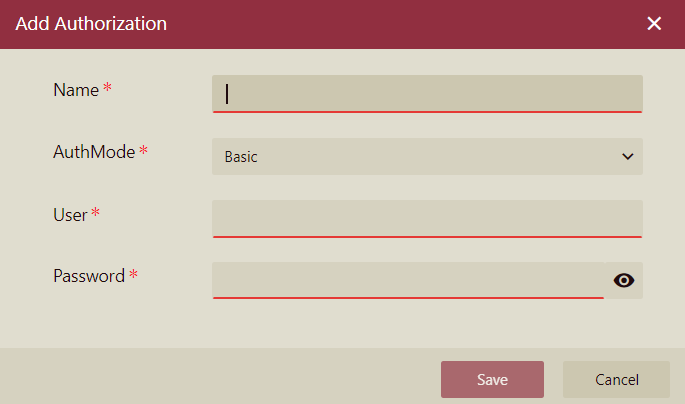
Authorization: Select an existing authorization detail. You can also add a new authorization using the Add Authorization popup. Click the + button and add the details (name, authentication mode, username, and password) in the Add Authorization popup. The available authentication modes (AuthMode) are explained below,
Basic: Involves sending a username and password encoded in base64 with each API request via the
Authorizationheader.OAuth2: A token-based authentication method where a client exchanges credentials for an access token, which is then used to authenticate API requests without sharing the credentials directly.
Request Header: Add request headers (header key and header value) using the + button.
Output Configuration
Variable: Specify the variables that will be parsed from the Pre-Request result using the JSON Path. Click the + button to add the Variable Name and JSON Path of the variable.
Note: The variable name must be unique within the scope of the data source file.
Use Pre-Request
A Pre-Request defines variables that can be used in the URL, header, and body of all entities (base addresses, endpoints, or other Pre-Requests) that reference it directly or indirectly. Use the following syntax to reference a variable to the Pre-Request:
${variableName}Note the following,
Each base address, endpoint, and Pre-Request can only have one Pre-Request unless the reference chain forms a ring (which is not allowed).
Pre-request and endpoint names must be globally unique within the data source file to avoid conflicts.