-
Interactive DashboardsCreate interactive BI dashboards with dynamic visuals.
-
End-User BI ReportsCreate and deploy enterprise BI reports for use in any vertical.
-
Wyn AlertsSet up always-on threshold notifications and alerts.
-
Localization SupportChange titles, labels, text explanations, and more.
-
Wyn ArchitectureA lightweight server offers flexible deployment.
-
 Wyn Enterprise 7.1 is ReleasedThis release emphasizes Wyn document embedding and enhanced analytical express...
 -
 Choosing an Embedded BI Solution for SaaS ProvidersAdding BI features to your applications will improve your products, better serve your customers, and more. But where to start? In this guide, we discuss the many options.
-
Visual GalleryInteractive sample dashboards and reports.
-
BlogExplore Wyn, BI trends, and more.
-
WebinarsDiscover live and on-demand webinars.
-
Customer SuccessVisualize operational efficiency and streamline manufacturing processes.
-
Knowledge BaseGet quick answers with articles and guides.
-
VideosVideo tutorials, trends and best practices.
-
WhitepapersDetailed reports on the latest trends in BI.
-
 Choosing an Embedded BI Solution for SaaS ProvidersAdding BI features to your applications will impr...
 -

- Getting Started
- Administration Guide
-
User Guide
- An Introduction to Wyn Enterprise
- Document Portal for End Users
- Data Governance and Modeling
- View and Manage Documents
- Working with Resources
-
Working with Reports
- Report Designer
- Data Binding in Reports
- Master Reports
- Report Controls
- Data Analysis and Interactivity
- Expression Editor
- Page Layout
- Styles and Themes
- Preview Report
- Export Report
- Report Templates
- Using Report Designer
- Report Render Mode
- Time Zone Setting
- Working with Dashboards
- Working with Notebooks
- Wyn Analytical Expressions
- Section 508 Compliance
- Subscribe to RSS Feed for Wyn Builds Site
- Developer Guide
Axis
Common
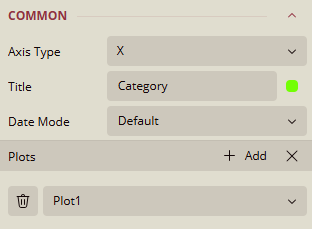
Axis Type
Specifies the axis orientation.
Current value:
X, other value:Y
Title
Defines the title of the axis.
Current value:
CategoryData Binding supported.
Date Mode
Controls how date values are interpreted.
Current value:
Default, other options:Millisecond,Second,Minute,Hour,Day,WeekandMonth.
Plots
Indicates which plot the axis is linked to.
Current value:
Plot1Use the (+) to add items and the three-line option to show items.
Appearance
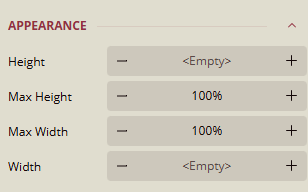
Height / Max Height / Max Width / Width
Controls the dimensions of the axis container.
Default:
<Empty>or100%
Title
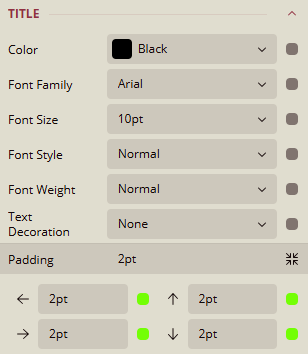
Color
Sets the color of the axis title.
Current value:
Black, includes other options.Data Binding supported.
Font Family
Specifies the font used for the axis title.
Current value:
Arial, include other options.Data Binding supported.
Font Size
Sets the size of the axis title text.
Current value:
10ptData Binding supported.
Font Style
Defines the style of the font.
Current value:
NormalData Binding supported.
Font Weight
Specifies the weight of the font.
Current value:
NormalData Binding supported.
Text Decoration
Applies additional styling such as
Underline,Overline, andLineThrough.Current value:
NoneData Binding supported.
Padding
Sets the spacing around the title text.
Value:
2pton all sides.Expand for more options.
Data Binding supported.
Line
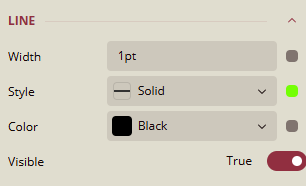
Width
Sets the thickness of the axis line.
Default value:
1ptData Binding supported.
Style
Defines the line style.
Current value:
Solid, other options:Solid,Dotted,Dashed, etc.Data Binding supported.
Color
Sets the color of the axis line.
Current value:
Black, other options:Palettes,Other Colors,Web ColorsData Binding supported.
Visible
Toggles visibility of the axis line.
Current value:
True
Labels
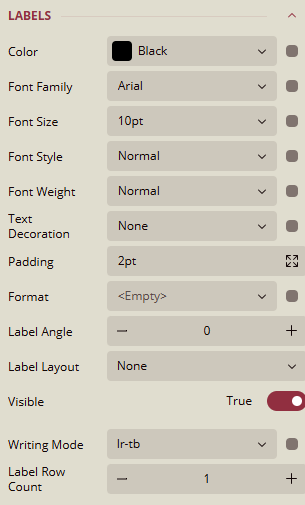
Color
Sets the color of the axis labels.
Current value:
Black, other options:Palettes,Other Colors,Web ColorsData Binding supported.
Font Family
Specifies the font used for labels.
Current value:
Arial, include other options.Data Binding supported.
Font Size
Sets the size of the label text.
Current value:
10ptData Binding supported.
Font Style
Defines the style of the font.
Current value:
NormalData Binding supported.
Font Weight
Specifies the weight of the font.
Current value:
NormalData Binding supported.
Text Decoration
Applies additional styling such as
Underline,Overline, andLineThrough.Current value:
NoneData Binding supported.
Padding
Sets the spacing around the label text.
Value:
2pton all sides.Expandable for more options.
Format
Specifies how label values are displayed.
Options:
Default,Currency,Decimal,Scientific,Fixed-point,General,Number,Percent.
Label Angle
Controls the rotation angle of the label text.
Current value:
0
Label Layout
Manages the layout behavior of labels.
Options available:
None,Default,Clip,Ellipsis, andWrap.
Visible
Toggles visibility of the labels.
Current value:
True
Writing Mode
Defines the text direction for labels.
Options available:
Ir-tbandtb-rl.
Label Row Count
Sets the number of rows for label display.
Default:
1
Major Grid
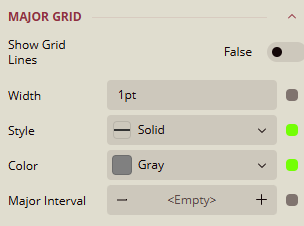
Show Grid Lines
Toggles visibility of major grid lines.
Current value:
False
Width
Sets the thickness of grid lines.
Default value:
1ptData Binding supported.
Style
Defines the grid line style.
Options:
Solid,Dotted,Dashed, etc.Data Binding supported.
Color
Sets the color of grid lines.
Current value:
Gray, other options:Palettes,Other Colors,Web ColorsData Binding supported.
Major Interval
Controls spacing between major grid lines.
Default:
<Empty>Data Binding supported.
Major Ticks
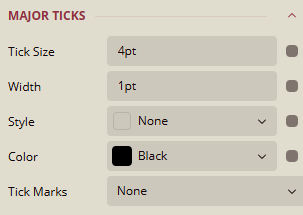
Tick Size
Sets the size of major ticks.
Default value:
4ptData Binding supported.
Width
Sets the thickness of ticks.
Default value:
1ptData Binding supported.
Style
Defines the style of grid lines.
Options:
Solid,Dotted,Dashed, etc.Current value:
NoneData Binding supported.
Color
Sets the color of grid lines.
Current value:
Black, other options:Palettes,Other Colors,Web ColorsData Binding supported.
Tick Marks
Controls the appearance of tick marks on the axis.
Current value:
None, other options:Cross,Inside,Outside.
Minor Grid
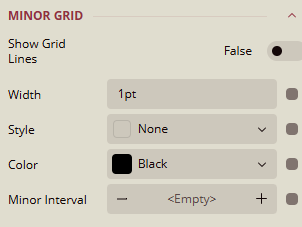
Show Grid Lines
Toggles visibility of minor grid lines.
Current value:
False
Width
Sets the thickness of grid lines.
Default value:
1ptData Binding supported.
Style
Defines the grid line style.
Current value:
NoneData Binding supported.
Color
Sets the color of grid lines.
Current value:
Black, other options:Palettes,Other Colors,Web ColorsData Binding supported.
Major Interval
Controls spacing between grid lines.
Default:
<Empty>Data Binding supported.
Minor Ticks
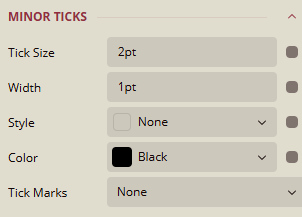
Tick Size
Sets the size of minor ticks.
Default value:
2ptData Binding supported.
Width
Sets the thickness of ticks.
Default value:
1ptData Binding supported.
Style
Defines the style of grid lines.
Options:
Solid,Dotted,Dashed, etc.Current value:
SolidData Binding supported.
Color
Sets the color of grid lines.
Current value:
Black, other options:Palettes,Other Colors,Web ColorsData Binding supported.
Tick Marks
Controls the appearance of tick marks on the axis.
Current value:
None, other options:Cross,Inside,Outside.
Scale
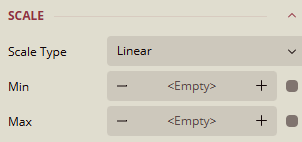
Scale Type
Defines the scale used for the axis.
Current value:
Linear, other options:Logarithmic,Ordinal,Percentage.
Min / Max
Sets the minimum and maximum values for the axis.
Default:
<Empty>Data Binding supported.
Layout
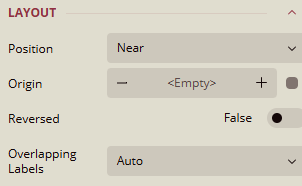
Position
Sets the position of the axis.
Current value:
Near, other options:NoneandFar.
Origin
Defines the origin point of the axis.
Default:
<Empty>Data Binding supported.
Reversed
Toggles axis direction.
Current value:
False
Overlapping Labels
Controls how overlapping labels are handled.
Value:
AutoandShow.