-
Interactive DashboardsCreate interactive BI dashboards with dynamic visuals.
-
End-User BI ReportsCreate and deploy enterprise BI reports for use in any vertical.
-
Wyn AlertsSet up always-on threshold notifications and alerts.
-
Localization SupportChange titles, labels, text explanations, and more.
-
Wyn ArchitectureA lightweight server offers flexible deployment.
-
 Wyn Enterprise 7.1 is ReleasedThis release emphasizes Wyn document embedding and enhanced analytical express...
 -
 Choosing an Embedded BI Solution for SaaS ProvidersAdding BI features to your applications will improve your products, better serve your customers, and more. But where to start? In this guide, we discuss the many options.
-
Visual GalleryInteractive sample dashboards and reports.
-
BlogExplore Wyn, BI trends, and more.
-
WebinarsDiscover live and on-demand webinars.
-
Customer SuccessVisualize operational efficiency and streamline manufacturing processes.
-
Knowledge BaseGet quick answers with articles and guides.
-
VideosVideo tutorials, trends and best practices.
-
WhitepapersDetailed reports on the latest trends in BI.
-
 Choosing an Embedded BI Solution for SaaS ProvidersAdding BI features to your applications will impr...
 -

- Getting Started
- Administration Guide
-
User Guide
- An Introduction to Wyn Enterprise
- Document Portal for End Users
- Data Governance and Modeling
- View and Manage Documents
- Working with Resources
-
Working with Reports
- Report Designer
- Data Binding in Reports
- Master Reports
- Report Controls
- Data Analysis and Interactivity
- Expression Editor
- Page Layout
- Styles and Themes
- Preview Report
- Export Report
- Report Templates
- Using Report Designer
- Report Render Mode
- Time Zone Setting
- Working with Dashboards
- Working with Notebooks
- Wyn Analytical Expressions
- Section 508 Compliance
- Subscribe to RSS Feed for Wyn Builds Site
- Developer Guide
Plot
Common
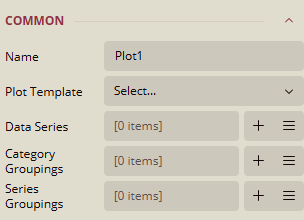
Name
Specifies the name of the plot.
Current value:
Plot1
Plot Template
Allows selection of a predefined plot style.
Options available via dropdown.
Data Series
Defines the data values to be visualized.
Current value:
[0 items]Use (+) to add items and the three-line menu to manage them.
Category Groupings
Group the data into categories for plotting.
Current value:
[0 items]Use (+) to add items and the three-line menu to manage them.
Series Groupings
Group data into series for comparison.
Current value:
[0 items]Use (+) to add items and the three-line menu to manage them.
Config
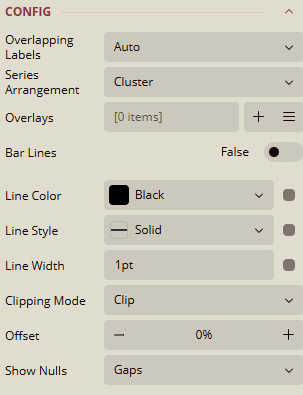
Overlapping Labels
Controls how overlapping labels are handled.
Current value:
Auto, other options:ShowandHide.
Series Arrangement
Defines how series are arranged in the plot.
Current value:
Cluster, other options:Stack.
Overlays
Allows adding overlay elements to the plot.
Current value:
[0 items]Use (+) to add items and the three-line menu to manage them.
Bar Lines
Toggles visibility of bar lines.
Current value:
False
Line Color
Sets the color of bar lines.
Current value:
Black, other options:Palettes,Other Colors,Web ColorsData Binding supported.
Line Style
Defines the style of bar lines.
Current value:
Solid, other options:Dotted,Dashed, etc.Data Binding supported.
Line Width
Sets the thickness of bar lines.
Default value:
1ptData Binding supported.
Clipping Mode
Controls how content is clipped within the plot area.
Current value:
Clip, other options:NoneandFit.
Offset
Adjusts the position of the plot elements.
Current value:
- 0% +
Show Nulls
Defines how null values are displayed.
Current value:
Gaps, other options:ConnectedandZeros.
Color Legend Series
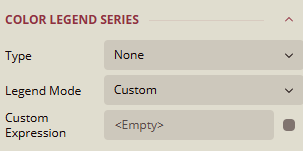
Type
Specifies the type of color legend.
Current value:
NoneOther values:
Apply Parameters,Jump to Report,Jump to Bookmark, andJump to URL.
Legend Mode
Controls how the legend is displayed.
Current value:
CustomOther values:
None,Series Groups, andData Values.
Custom Expression
Allows defining a custom expression for legend values.
Default:
<Empty>Data Binding supported.
Bar Settings
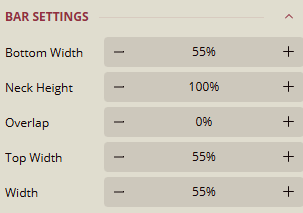
Bottom Width
Sets the width of the bar base.
Current value:
- 55% +
Neck Height
Defines the height of the bar neck.
Current value:
- 100% +
Overlap
Controls the overlap between bars.
Current value:
- 0% +
Top Width
Sets the width of the bar top.
Current value:
- 55% +